
The Operating System
for Founders
FounderOS helps founders execute with clarity, prioritize faster, and operate their company from one AI-powered command center.
Free forever plan · No credit card required
Execution Score
+27%
AI Priority Engine
Active
Momentum
100%
Built for founders, operators and builders
The problem
Founders don't need more tools.
They need clarity.
Scattered workflows
Specs in one tool, tasks in another, decisions buried in chat.
Endless context switching
Every founder hour fragmented across ten surfaces.
Strategic overload
Too many priorities, no clear next move that compounds.
Execution inconsistency
Sprints start strong, momentum dies by Wednesday.
Disconnected apps
Notes, tasks, OKRs, and AI never see the same context.
The solution
One workspace for
strategy and execution.
AI Strategic Assistant
A co-pilot that knows your goals, constraints, and roadmap — and tells you what matters next.
Learn more →Execution Task System
Tasks, sprints, and rituals built for founders, not project managers.
Learn more →Smart Notes Workspace
Capture instantly. Notes link to tasks, decisions, and strategy — never orphaned again.
Learn more →Founder Focus Dashboard
One screen to see momentum, focus hours, and the moves that move the needle.
Learn more →AI-Powered Recommendations
Pattern-matched playbooks pulled from how the best operators ship.
Learn more →Cross-device Experience
Web, desktop, mobile — your operating system follows you, not the other way around.
Learn more →Product tour
Built for execution, not busywork.
FOUNDER COCKPIT
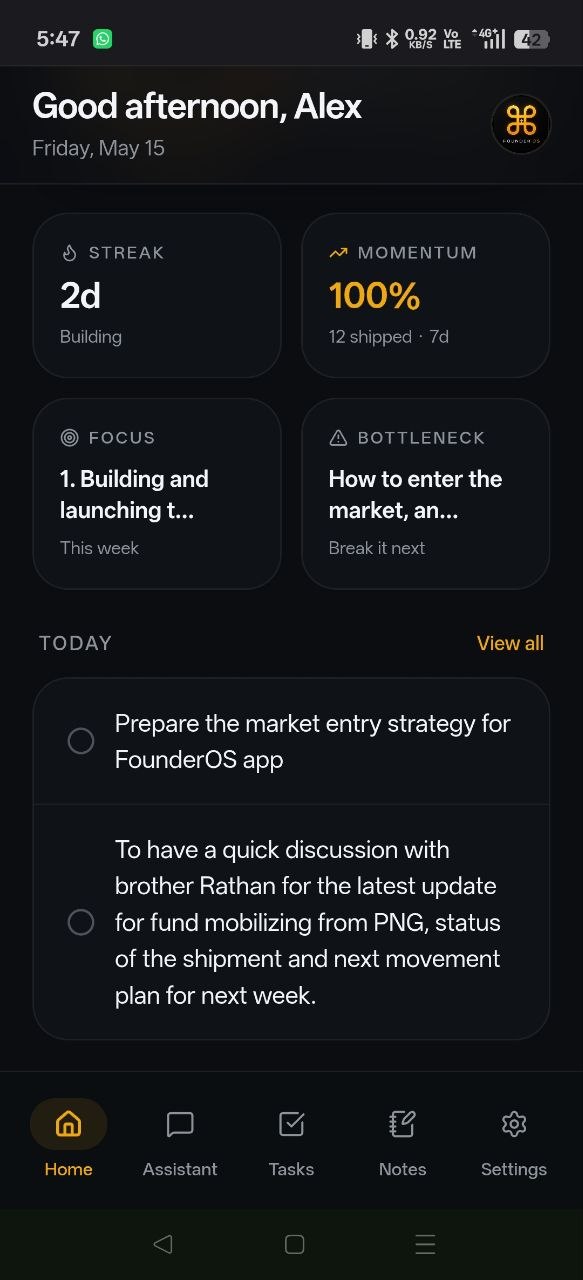
One screen. Total clarity.
The Home dashboard surfaces your execution score, momentum, focus hours, and current bottleneck — so the most important move is always one glance away.
- Execution score updates in real time
- Momentum and focus tracked daily
- Bottlenecks surfaced before they cost you a week
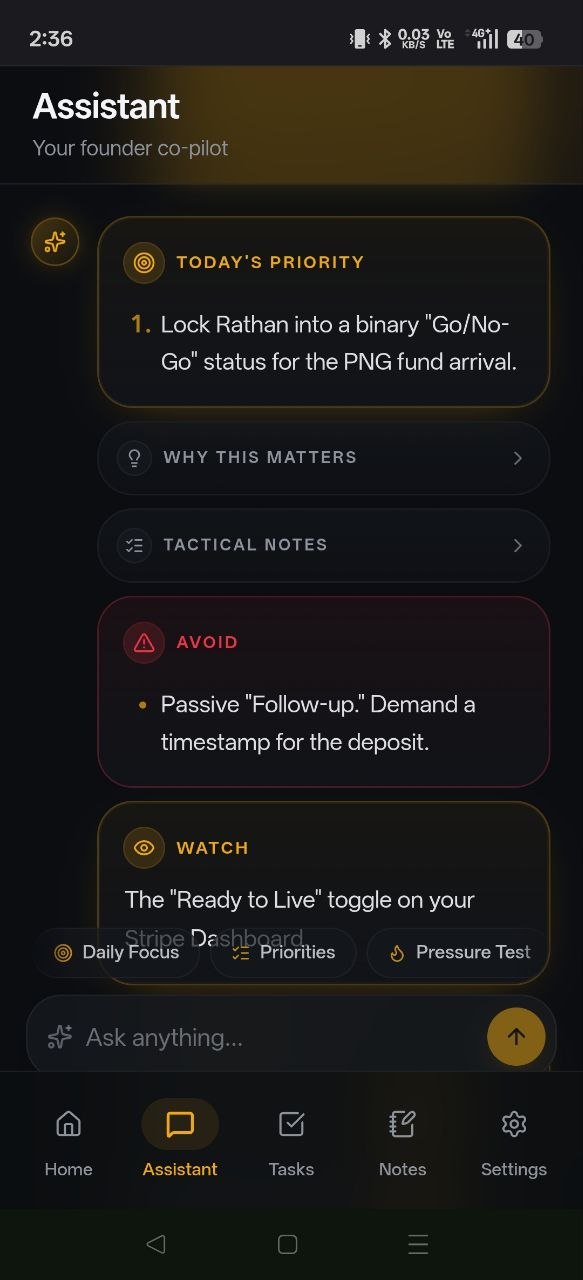
Strategic AI
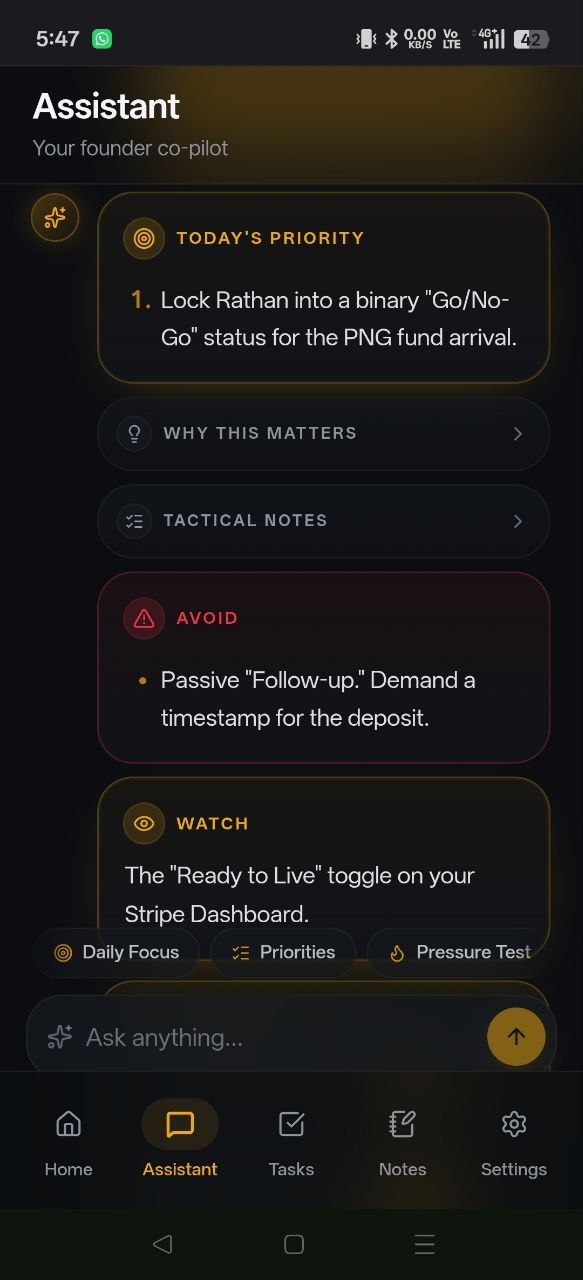
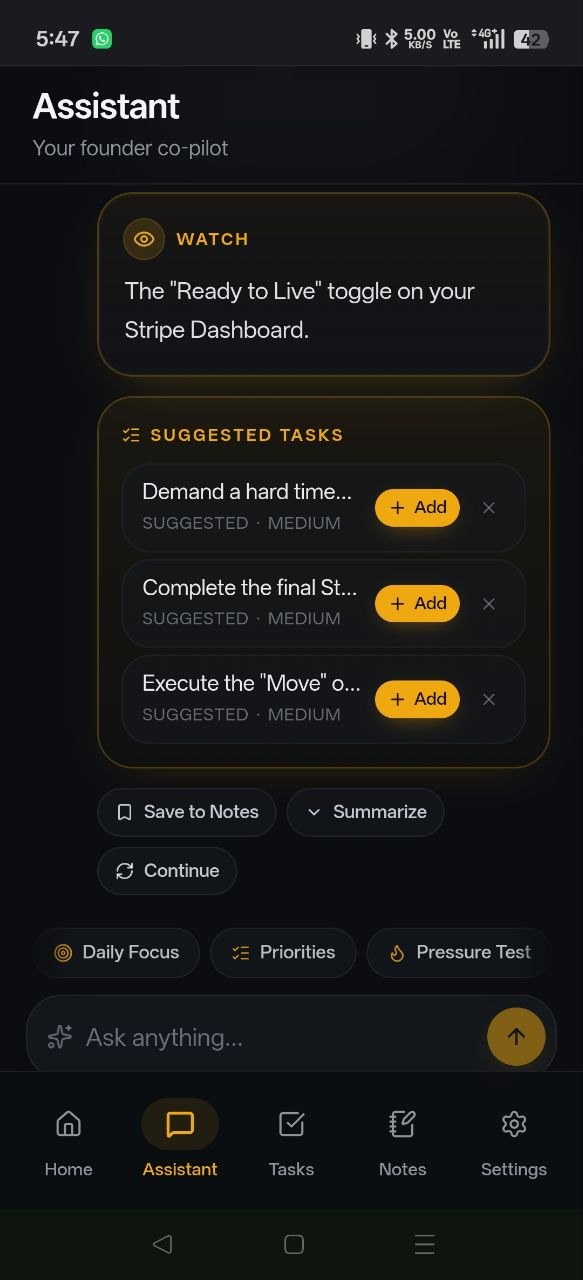
A co-pilot that pressure-tests your thinking.
Stop guessing what to ship. The Assistant knows your goals, constraints, and roadmap — and tells you the highest-leverage move for today, this week, this quarter.
- Today's Priority — the single move that moves the needle
- Pressure-tests strategy, decisions, and trade-offs
- Grounded in your real roadmap, not generic advice
Highest-leverage move
Ship onboarding v2 — unlocks activation north star.
New feature scoping — adds drag without compounding.
Mobile-first
Founder focus, in your pocket.
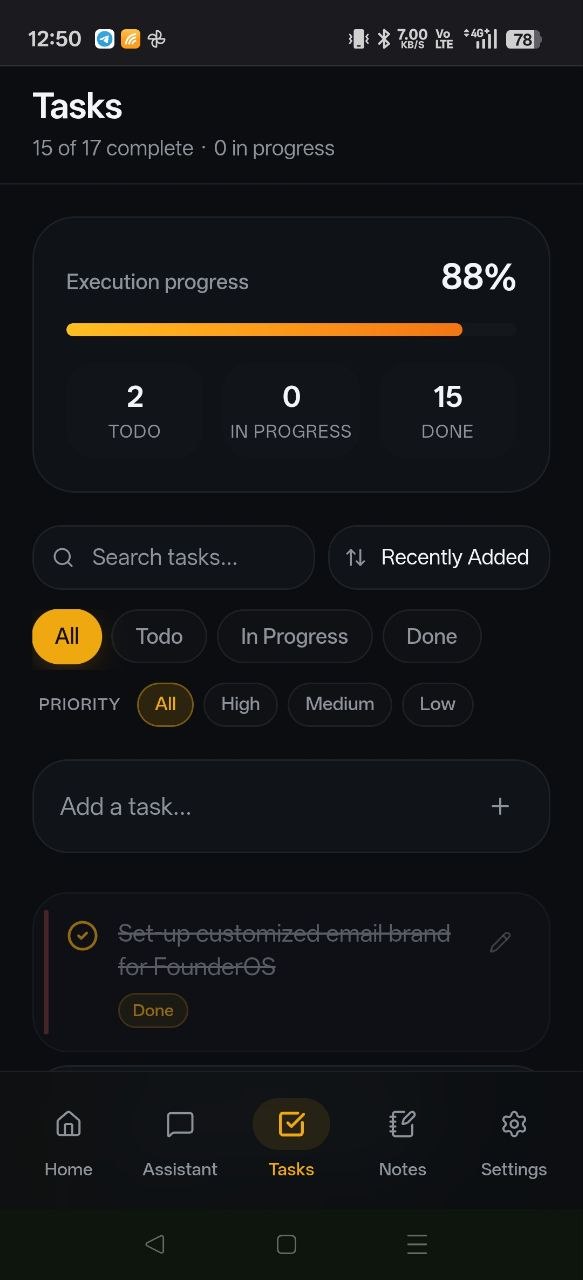
Capture, plan, and execute from anywhere. Your AI command center is always one tap away — synced in realtime with your desktop workspace.
- Home dashboard — total clarity in a single glance
- AI assistant — strategic second brain, always with you
- Seamless sync — mobile to desktop, zero friction
Ship v2 onboarding flow
Retention-first — completing onboarding drives 3x higher activation.
Design review at 2 PM. Have user flow prototype ready.
Pricing
Simple plans. Built for builders.
Start free. Upgrade when you outgrow it. Cancel anytime.
Free
For founders getting started.
- ✓Basic workspace
- ✓Limited AI usage
- ✓Notes and tasks
- ✓1 device
Founder Pro
For founders shipping every week.
- ✓Unlimited AI sessions
- ✓Advanced execution tools
- ✓Premium founder workflows
- ✓Priority feature access
- ✓Cross-device sync
FAQ
Questions, answered.
What is FounderOS?+
FounderOS is an AI-powered operating system for founders. It combines strategy, execution, notes, and a focus dashboard into one calm workspace — so you always know the next move that compounds.
Who is FounderOS for?+
Solo founders, early-stage operators, and small founding teams who need clarity, leverage, and disciplined execution without stitching together five tools.
Is there a free plan?+
Yes — FounderOS Free is free forever, no credit card required. Upgrade to Founder Pro at $19/month when you're ready for unlimited AI and advanced execution tools.
Can I cancel anytime?+
Yes. Cancel in one click from your billing settings. We also offer a 14-day refund — no questions asked.
Is my data secure?+
Your data is encrypted in transit and at rest. We never train on your data, and you can export or delete everything at any time.
Does it work on mobile?+
FounderOS is fully cross-device — web, desktop, and mobile — synced in realtime so your command center is always one tap away.
Build with clarity.
Operate with focus, execution, and strategic momentum.
Mobile Experience
Install FounderOS
Get the full app-like experience on iPhone and Android.
Install on iPhone
- 1
Open FounderOS in Safari
- 2
Tap the Share button
- 3
Tap “Add to Home Screen”
Install on Android
- 1
Open FounderOS in Chrome
- 2
Tap “Install App”
- 3
Launch from your home screen
Trusted by operators
Built for founders, operators and builders.
The teams shipping the fastest run on FounderOS.
3.2x
Faster decision velocity
94%
Weekly active founders
12hrs
Reclaimed per week
1,400+
Founders operating
Maya Chen
Founder, Northwind Labs
Daniel Roth
Solo Founder, Caelum
Priya Anand
Co-founder & CEO, Stacklight